
For Windows and macOS
Astrology software that grows with you.
From your first chart to in-depth astrological analysis. Celestium brings calculation, learning and research together in one calm, well-organised workspace.
The sky right now
- Sun26°49′ ♍︎
- Moon06°28′ ♑︎
- Mercury14°35′ ♎︎
- Venus05°15′ ♏︎
- Mars25°00′ ♋︎
- Jupiter17°29′ ♌︎
- Saturn12°26′ ♈︎Retrograde
- Uranus05°39′ ♊︎Retrograde
- Neptune03°10′ ♈︎Retrograde
- Pluto03°13′ ♒︎Retrograde
- Ascendant09°47′ ♈︎
- Midheaven03°37′ ♑︎
This is where the sky stood when this page was built. In Celestium you do the same with your own birth details.
Astrology can be complex. The software does not have to be.
Astrology has many layers. That does not have to make the software complicated. Celestium keeps the chart at the centre and brings the options you need together in a logical, well-organised way.
- Built to stay calm
- Logically organised
- Inviting to explore
First look
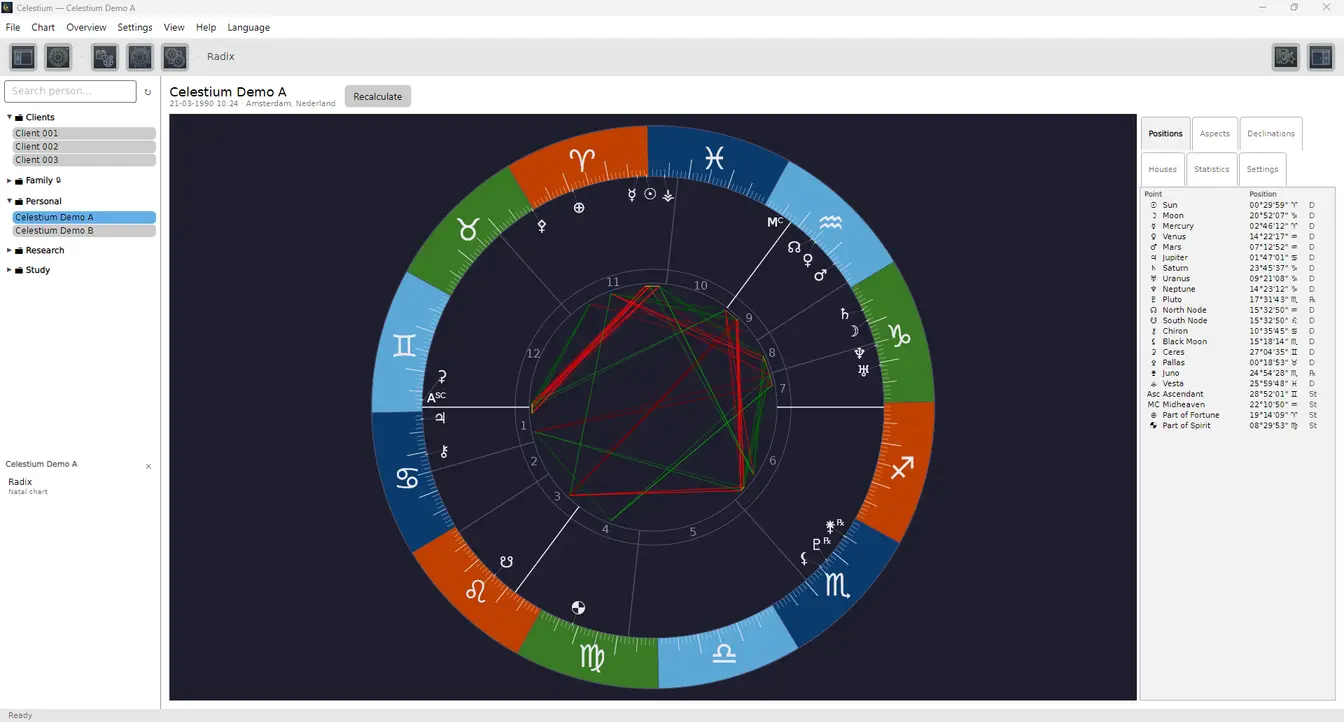
The chart comes first.
Open Celestium and get straight to work. What you need is close at hand; what you do not need stays out of sight.
Celestium grows with you
Start with what you need. Grow further when you want.
Celestium is a full environment for learning astrology and putting it to work. When you want to go deeper, Celestium Pro adds further techniques for advanced analysis, professional use and research.
- First chart
- Everyday practice
- Deeper study & research
Key capabilities
What you often need, within reach.
A first look at the charts, techniques and analyses you can work with in Celestium.
Creating new charts
- Natal chart
- Solar and lunar returns
- Secondary progressions
- Solar Arc directions
- Horary chartPro
Combining & tracking
- Synastry
- Composite
- CombinePro
- Current transits
- DavisonPro
Analysing & researching
- Aspects and aspect patterns
- Planet Patterns
- DispositionsPro
- Antiscia
- Fixed starsPro
Pro marks Celestium Pro only. Everything else is in both editions.
Learning and reference
Learning as you work.
Explanation and background are available right inside Celestium. Explore astrological concepts and the history of astrology without leaving your workspace. The explanations suit different levels of experience, so Celestium helps you not only calculate, but also understand. The history and the glossary are written in Dutch for now.
NederlandsEnglishDeutschFrançais
- History
- Explanations on the screens
- ConceptsPro
- Four languages
A taste of Pro
For going further.
Celestium Pro builds on the familiar Celestium workspace, with further techniques for deeper study, analysis, research and professional use.

Try Celestium for fourteen days.
Find out for yourself whether Celestium suits the way you learn, research and apply astrology.
- 14 days
- No payment details